Keeping up with the teacher while you take notes is a common problem for a student. The human body simply cannot write fast enough. You might say "But surely this problem can be solved with technology. Isn't typing faster than hand writing?". While it is true that typing is faster on average, it still is not enough. A new app, however, is trying to solve this in its own way: SwiftKey Note.
 |
| "Your notes, effortlessly organized." |
Touting itself as the "Smarter autocorrect that knows you", SwiftKey Note is a new iOS application that aims to make note taking on iOS devices a more efficient process. The more you use it, the more the application learns about how you type. Simply put, once you use the application for a while, it will be able to predict what word you want to type next.
 |
| You know you're best friends when you can finish each other's sentences |
Indeed, taking notes on SwiftKey Note is a more efficient process. The application is very good at suggesting words that come next, inserting it into the sentence with a simple tap. Of course, you'll need to type out the word yourself if none of the suggestions match, but don't worry - it'll learn.
Another great feature of the app is Evernote integration. If you haven't heard about it by now, Evernote is a great multi-platform note taking service. Once you sign up for it, any notes you take with it are saved to your account, and you can access them anywhere though your computer, phone, or tablet. SwiftKey Note lets you save your notes to Evernote and access old ones. Forget to bring your iPad to school? You'll still be able to access your notes on your phone or computer through Evernote.
"Of course, you'll need to type out the word yourself if none of the suggestions match, but don't worry - it'll learn."
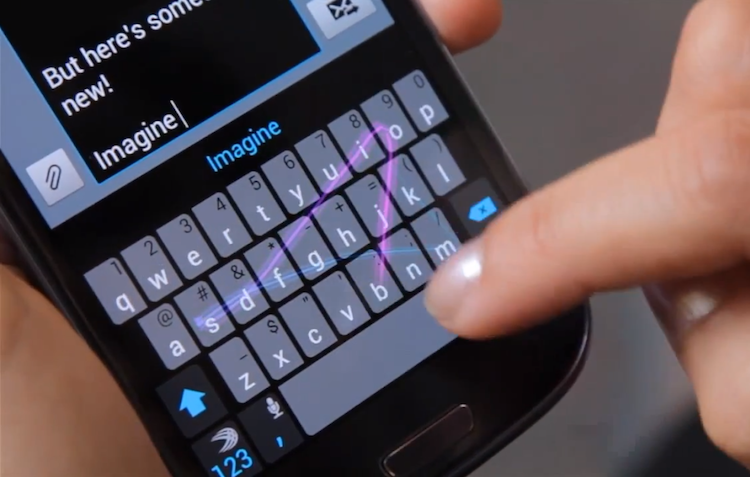
One of the things that I feel is missing from SwiftKey Note is flow typing. Anyone who has used the SwiftKey keyboard, Google Keyboard or Swype Keyboard on an Android device knows what I'm talking about. It's a key feature in modern smart devices: the ability to type words without having to remove your finger from the screen. Rather than tap out each letter, you can simply tap the first letter and then glide your finger across the screen to each successive letter. The result is an even faster typing experience. SwiftKey Keyboard for Android has this baked in, but it's missing in the iOS SwiftKey Note app. Maybe it's a feature that will be added in a future update, or maybe it's a limitation of iOS itself, but the lack of flow typing is one of the few weak points of the app.
 |
| Flow-style typing demonstrated on SwiftKey for Android |
Overall, SwiftKey Note gets a 9 out of 10. It has smarter auto correction that learns from you, and syncs your notes with Evernote so that you'll always have access to them from any device. The lack of flow typing is sorely missed by anyone who has used the feature on Android. Still, typing efficiency is indeed increased while using this app, and will continue to do so the longer the app learns from you. For a student trying to take notes in class, or just anyone trying to increase their typing speed, SwiftKey Note is definitely worth checking out.